Creating an effective advertising banner is not just about beautiful design. A successful banner must grab attention in a few seconds, convey the key message, and encourage the user to click on it. That is why it is important not only to design the creative properly, but also to think through its structure, copy, and call to action.
In this step-by-step guide, we will show the entire process of creating banner ads – from setting a goal and choosing the right format to launching the finished creative. You will also learn how to create a banner in two ways: manually in the BannerBoo editor or using the AI Banner Generator, and at the end, you can check your design against a checklist of 10 key elements of an effective banner.
1. Defining the Goal and KPIs
Every successful advertising campaign starts with a clearly defined goal. This allows you to properly set up all subsequent stages of work.
Recommendations:
- Define the main goal of the campaign:
- Increasing brand awareness;
- Lead generation;
- Driving website traffic;
- Increasing conversions.
- Set key performance indicators (KPIs). These can be metrics such as CTR (click-through rate), CPC (cost per click), conversions, or ROI (return on investment). It is important that your KPIs align with your main goal.
- Set realistic KPI targets. For example, CTR > 1%, CPC < $1, conversion rate > 5%.
- Align the goal with audience needs. Understand what your audience expects and adapt the goal accordingly.
- Segment goals for different platforms. For example, LinkedIn campaigns might focus on B2B leads, while Meta is suitable for engaging a broader audience.
Tip: Goals and KPIs should be specific, measurable, achievable, relevant, and time-bound (SMART).
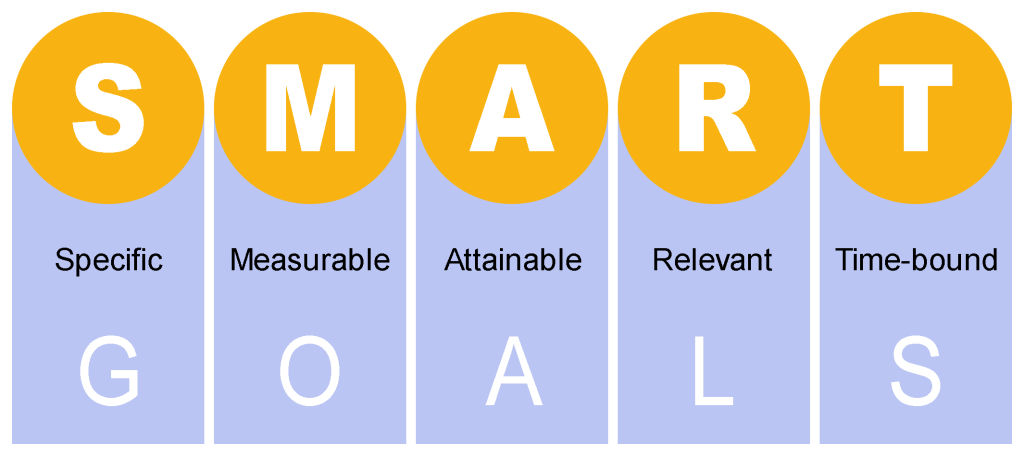
* SMART goals diagram
2. Target Audience Analysis
Understanding the needs and behavior of your target audience allows you to create relevant ads that truly interest users. The more accurately you define your audience, the higher the likelihood that your banners will work.
Recommendations:
- Conduct audience research. Use analytics tools such as Google Analytics, Meta Insights, or LinkedIn Audience Manager to collect and analyze data.
- Segment the audience. Divide the audience by age, gender, geography, interests, and other parameters.
- Evaluate the needs and pain points of your audience. What concerns them? How can your product or service help them?
- Consider the context. For example, a professional and formal approach is important for a B2B audience, whereas emotional and visually appealing banners work well for B2C.
- Analyze competitor ads. Find out what formats and messages they use to discover opportunities for improving your own campaigns.
Tip: Research your audience deeper by creating personas (generalized profiles of ideal customers) that include key characteristics, interests, behavior, and purchasing habits. This will allow you not just to target segments, but to create personalized advertising messages that perform better.
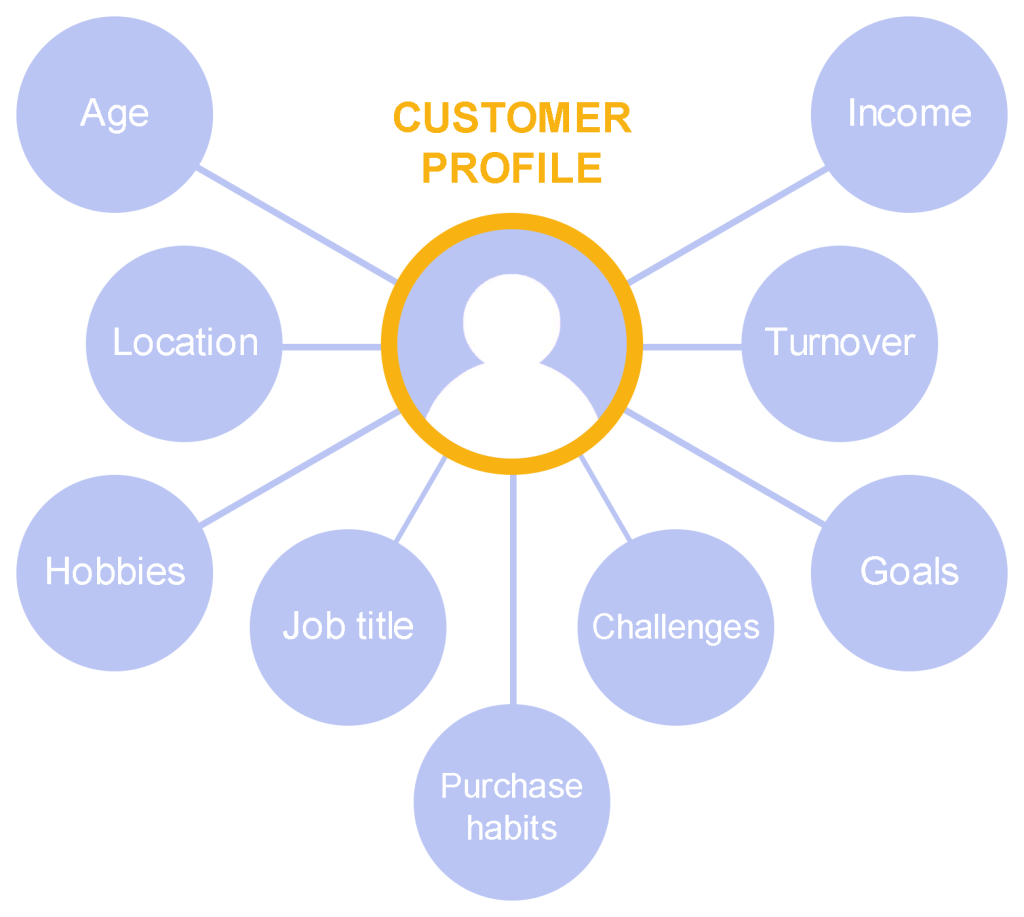
* Customer persona with key characteristics
For banner advertising to bring maximum effect, you need to properly determine where and in what format to place it. The choice of placement channels must be strategic and align both with the campaign goals and the characteristics of the target audience.
Recommendations:
- Choose channels:
-
Google Display Network (GDN) or programmatic platforms allow you to reach a wide audience on popular websites;
-
Meta social networks (Facebook, Instagram) or X (Twitter) work well for campaigns aimed at user engagement;
-
LinkedIn Ads or native advertising in professional online publications are more effective for attracting B2B clients;
-
If your audience actively consumes video content, consider YouTube Ads or TikTok Ads;
-
Email newsletters can also be an effective channel for placing banners, especially for B2B audiences and loyal customers.
- Plan the banner format. The overall choice of format must meet not only platform requirements, but also the level of audience engagement: static banners are suitable for quick delivery of information, while animated ones are ideal for creating a more dynamic advertising message and attracting attention. The most common banner formats are JPEG, PNG, GIF, HTML5, MP4.
- Consider banner sizes. Each platform has its own banner size requirements. Most popular sizes: Medium Rectangle (300x250), Leaderboard (728x90), Wide Skyscraper (160x600). Adapt banners for mobile devices (for example, 320x50).
- Use a multi-format approach. The same message adapted to different sizes and platforms will ensure a consistent visual perception.
Tip: Align with the stages of the sales funnel. For example, for the top of the funnel (TOFU), use channels for broad audience reach; for the middle of the funnel (MOFU) — retargeting, email ads, native advertising; for the bottom of the funnel (BOFU) — personalized offers in programmatic, remarketing in social networks and email. This will help allocate budget effectively and increase conversions.
4. Banner Concept Development and Copywriting
The concept and copy of a banner determine its ability to capture attention and drive action. Without a clear message, even the most attractive design will not achieve results.
Recommendations:
- Focus on benefits. Formulate a short message that clearly answers the question: "Why is this interesting or useful for the audience?".
Example: "Save 50% of your time creating banners!"
- CTA (call to action). A clear and visible CTA is the main driver of clicks. Use active verbs, for example: "Learn More", "Order Now", "Start for Free".
- Short copy. Avoid overload. Copy on the banner should be short and memorable, because banners represent advertising in a limited space.
- Adaptation to the audience. Consider how your audience perceives the value of your product. For example, if your audience consists of young entrepreneurs or startups, focus on innovation, flexibility, and the ability to get started quickly.
- Ad placement policies. Check whether the banner concept complies with the policies of the chosen platform.
Tip: Create a creative brief. This is a structured document that will serve as a guide for the team, ensuring a shared vision and efficient project execution.
5. Banner Design
Even the best copy will not attract attention without visual design that meets modern market standards.
Recommendations:
- Simplicity and minimalism. Banners must quickly convey the core idea. Avoid oversaturation with text or images.
- Visual hierarchy:
-
Headline — the most prominent element;
-
Images or icons reinforce the text;
-
The CTA button is usually highlighted with color or positioning.
- Brand identity. Use a logo, colors, fonts, and elements that match your brand. This increases brand recognition.
- Contrast. Sharp contrast between text and background aids readability. Ensure that the text size allows for easy reading.
- Animation. Use smooth animations to engage attention, but do not distract the user from the core message. Make sure there is enough time for the user to read your message.
- Mobile-first strategy consideration. Check how banners look on mobile devices, since a significant portion of traffic now comes from mobile.
Why is this important? If a banner looks sloppy or overloaded with information, the user might simply skip it. Visual appeal and simplicity are what help you stand out among other ads.
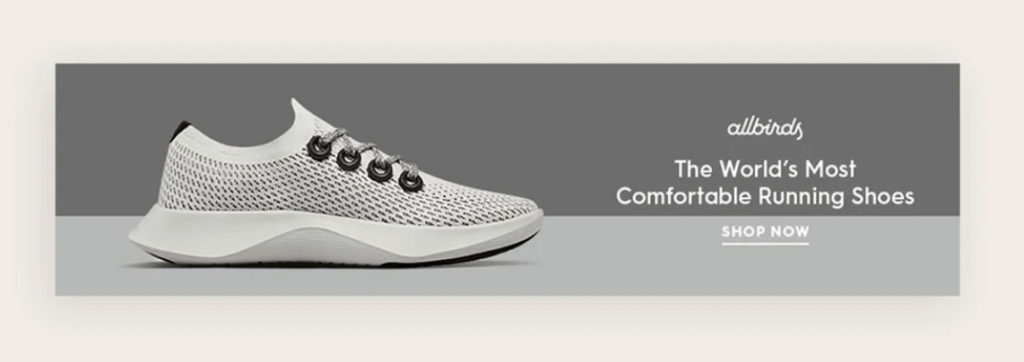
* source allbirds.com
While you're reading about trends and marketing, someone is already creating clickable ads in BannerBoo. Create animated HTML5 banners online without code or designers.
Try BannerBoo6. How to Create an Advertising Banner: Step-by-Step Guide
Now that you have defined your campaign goal, know your audience, and chosen the required banner size, it is time to move on to the most exciting part – creating the design.
Depending on your experience and task, this can be done in two ways:
- in a classic editor, if you want complete control over every design element;
- using the AI Banner Generator, if you need to quickly get ready-made concepts and refine them for your brand.
Let's consider both options.
Option 1. Creating a Banner in the Classic Editor
Step 1. Choose a Template or Create a Design from Scratch
Start by selecting a template that best matches your industry, brand style, or advertising campaign. If you already have a ready idea, you can start working from a blank canvas.
Ready-made templates help significantly reduce work time, as they already feature a well-thought-out composition, modern typography, and properly arranged elements.
Step 2. Personalize the Design
After choosing a template, replace the demo content with your own.
Add:
- company logo;
- headline;
- short description or special offer;
- call-to-action button;
- your own images;
- brand colors and fonts.
Try not to overload the banner with text. In most cases, a user spends only a few seconds deciding whether to pay attention to an ad.
Tip: One banner – one message. If a user needs to read too much, the effectiveness of the ad decreases.
Step 3. Add Animation
Animated banners help attract users' attention, especially in display advertising.
Use simple effects:
- smooth text appearance;
- button animation;
- subtle movement of graphic elements;
- slide transitions.
You should not use too many animations simultaneously – they can distract from the main message.
Step 4. Check the Result
Before publishing, review the banner carefully.
Make sure that:
- the headline is easy to read;
- the logo is clearly visible;
- the CTA button stands out;
- there is enough whitespace between elements;
- the design looks equally good across different banner sizes.
Step 5. Export the Banner
After completing your work, export the banner in the required format.
Depending on the advertising platform, this can be:
- PNG;
- JPG;
- GIF;
- HTML5;
- MP4.
After that, the banner is ready for campaign launch.
Option 2. Creating a Banner Using AI Banner Generator
If you need to quickly generate several ideas or do not want to start designing from scratch, use the AI Banner Generator.
Artificial intelligence will help create the foundation of your future banner in just a few seconds.
Step 1. Launch AI Banner Generator
Create a new project and open the AI Banner Generator.
Select the desired banner format or set custom dimensions.
Step 2. Describe the Desired Result
Enter a text prompt describing the future banner.
For example:
Create a modern advertising banner for a summer sportswear sale. Use a light background, bright accents, a large headline "Summer Sale – Up to 50% Off", and a "Shop Now" button.
The more precisely formulated the prompt is, the more relevant the result provided by AI will be.
Step 3. Choose the Best Concept
AI will generate several design variants.
Compare the composition, color scheme, typography, and overall impression of each layout, then select the one that best fits your brand.
Step 4. Edit the Design
After generation, make the necessary adjustments.
If needed:
- edit the copy;
- replace photos;
- add a logo;
- adjust colors;
- change fonts;
- update the call-to-action button.
This approach combines the speed of artificial intelligence with the ability to fully adapt the design to your company's style.
Step 5. Download the Ready Banner
After final editing, export the design in the required format and use it for advertising campaigns in Google Display Network, Meta Ads, LinkedIn, email newsletters, or on your own website.
7. Checking Compliance with Specifications and Technical Requirements
Advertising platforms may reject an ad if it does not meet their requirements, so checking compliance is a mandatory step.
Recommendations:
-
Check banner dimensions;
-
Make sure that your banner file format is supported by the chosen platform;
-
Adhere to file size limits;
-
Optimize images by compressing them without significant quality loss and ensure that the banner loads quickly;
-
Test the banner display across different devices and browsers;
-
Verify the correct setup of interactive elements (for example, whether the CTA button works);
-
Ensure that the banner complies with the policies of the chosen platform.
Tip: Create a checklist and always use it to identify and resolve issues in time. For example: Checklist for checking banner ad compliance (DOC) (PDF)
8. A/B Testing
A/B testing allows you to find the most effective banner, improving campaign performance based on real data.
Recommendations:
- What to test:
-
Headlines (for example, "Reduce Costs" vs. "Increase Revenue");
-
Call to action ("Learn More" vs. "Get an Offer");
-
Color schemes (bright CTA vs. neutral CTA);
-
Images (people vs. illustrations);
-
Element placement (CTA at the top of the banner vs. CTA at the bottom).
- How to conduct testing:
-
Run two variants simultaneously with identical settings for budget, targeting, and display schedule;
-
Test only one change at a time to get reliable results;
-
Consider the context. The same banner may perform differently across different networks, so test formats in each channel separately;
-
Evaluate results based on key KPIs (CTR, conversions, etc.).
- Test duration. Determine a minimum testing period (for example, 7 days) to obtain statistically significant results.
Tip: Do not limit yourself to a single test. Regularly analyze new hypotheses, combine the best-performing elements from previous tests, and adapt ads to changes in audience behavior and the competitive landscape.
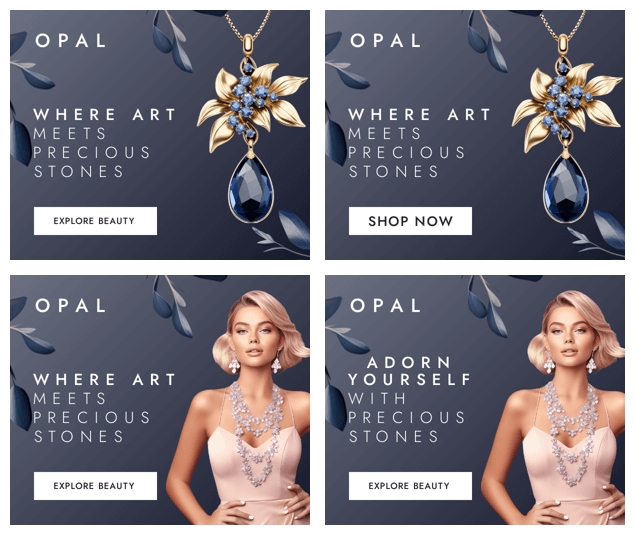
* A/B testing example using the BannerBoo template in the "Jewelry" category
9. Automating the Creation Process and Scaling
Marketers and digital agencies often work with multi-platform campaigns requiring dozens or even hundreds of banners in various sizes and formats. Using dedicated automation tools allows you to significantly simplify and accelerate this process, reduce costs, and avoid errors.
Recommendations:
- All-in-one platforms. Use platforms like BannerBoo, which allow you to automate the creation and editing of banners. This is especially useful for large campaigns where you need to work with many formats and sizes.
- Banner templates:
-
Develop base banner templates for your brand taking design requirements into account, which can easily be adapted for different campaigns;
-
Create versions for different audience segments (for example, for B2B clients and end consumers).
- Campaign scaling:
-
The functionality of an all-in-one platform allows you to automatically generate banners of various sizes adapted to the specifications of different platforms. This way, you can create one design and scale it;
-
Add personalization during the scaling stage (for example, altering the message based on region or audience segment).
Why is this important? Automation reduces the workload on the team and allows you to focus on strategic aspects of the campaign. In addition, it enables you to quickly adapt banners to different platforms and requirements.
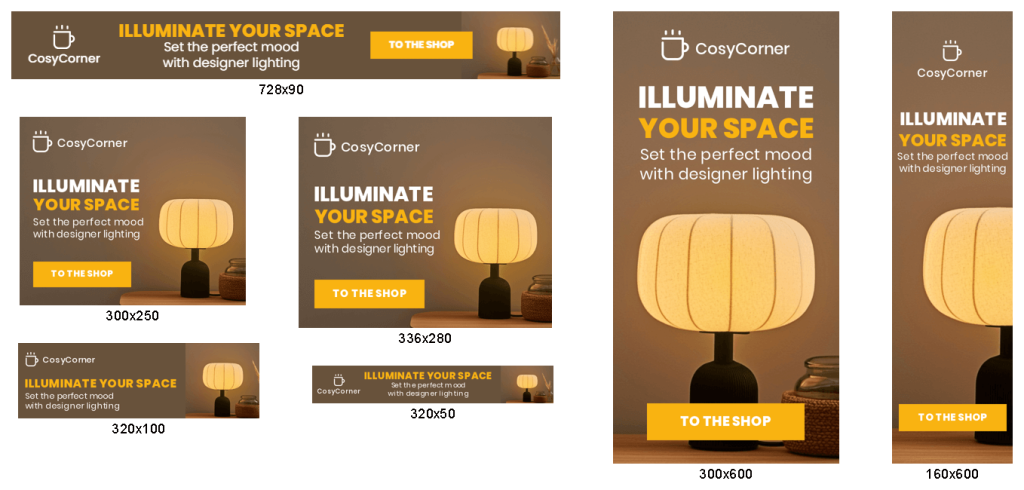
* Multi-format banner set example using the BannerBoo template in the "Retail" category
10. Campaign Launch and Monitoring
Launching an advertising campaign is just the beginning. Without continuous monitoring of its performance, you won't be able to understand whether your goals are being achieved.
Recommendations:
- Performance tracking:
-
Add UTM tags to all banners to track their performance in Google Analytics or other analytics platforms;
-
Use KPI metrics: CTR, CPC, conversions, etc.
- Real-time monitoring:
-
Use platforms with real-time analytics to react promptly to changes;
-
Track top-performing platforms and formats to reallocate budget.
- Working with audiences:
-
Set up remarketing for users who engaged with your banners but did not complete the target action;
-
Use lookalike audiences to attract new customers.
Why is this important? You need to be prepared for results to change depending on time, shifts in audience sentiment, or other external factors. Only continuous monitoring allows you to respond promptly to issues and adjust the campaign to achieve maximum results.
11. Optimization and Continuous Analysis
Campaigns are rarely perfect on the first try. Optimization based on collected data helps increase ROI and deliver better results for future campaigns.
Recommendations:
- Performance evaluation:
-
Analyze testing data to identify the best banners (for example, with the highest CTR);
-
Evaluate ROI: does the campaign justify the invested resources?
- Campaign adjustments:
-
Reallocate budget among top-performing ad sets or formats for maximum impact;
-
If CTR is low, test new headlines, CTAs, color schemes, or even adjust the target audience based on the results;
-
If conversions are not being achieved, check the relevance of the landing page where the banner leads.
- Documenting results. Record all findings (which options work best) to create an "idea bank" for future campaigns.
For example: Ad Campaign Dashboard.xlsx.
Why is this important? Banners can perform differently across different platforms or among different audience segments, so it is important to constantly analyze their performance and make necessary adjustments. Optimization should be an ongoing process.
Checklist: 10 Elements of an Ideal Advertising Banner
Before launching an advertising campaign, check if your banner meets the core requirements of effective design.
- Clear and understandable headline.
- One prominent call to action (CTA).
- Brand logo is clearly visible.
- Contrasting colors that facilitate information perception.
- Easy-to-read font.
- Minimal text.
- High-quality images or graphics.
- Well-thought-out visual hierarchy.
- Proper display on mobile devices.
- Correct format and size for the advertising platform.
Conclusion
Creating an effective banner is not a matter of complex tools or years of design experience. It is much more important to clearly understand the campaign goal, know your audience, and adhere to basic visual communication principles.
Using the step-by-step process outlined in this guide, you will be able to create banners faster that grab attention, meet advertising platform requirements, and help achieve marketing goals.
Whether you prefer the classic editor or use the AI Banner Generator for quick concept creation, remember to test different creative variants, analyze results, and continuously refine your advertising campaigns.