Banner ads remain one of the most effective ways to capture users' attention. At the same time, the importance of the ad's format is often underestimated. The file format isn't just a technical detail but a crucial factor that directly affects loading speed, visual quality, and user engagement level.
A perfectly designed banner ad with a strong message can be useless if saved in a format that's too "heavy". It loads slowly, slows down the web page, and the user simply doesn't get a chance to see it. On the other hand, an overly simplified ad may load instantly, but won't evoke the desired emotional response.
That's why, in this article, we won't just list the most popular formats. We'll consider their strengths and weaknesses, and share practical tips to help you choose the optimal format and properly optimize the files for maximum effectiveness.
Today's advertisers have at their disposal both classic raster graphics formats and complex multimedia solutions. Each format has a certain set of capabilities and technical limitations. Image quality, support for transparency, animation, interactive elements, and compatibility — all depend on the format. To choose the best option for your campaign, it's crucial to understand these specifics.
Let's look at the most common formats used for creating banner ads and their key characteristics.
JPEG or JPG is a raster image format that uses a lossy compression method, allowing for significant file size reduction. It's one of the oldest and most widely used image formats on the web.
Pros:
Cons:
PNG is a raster image format that uses a lossless data compression technique, preserving fine details, sharp lines, and smooth color transitions. Images in this format look especially good on modern high-resolution displays.
Pros:
Cons:
GIF is a raster image format that uses a lossless data compression technique, supports basic animation, and allows transparency (though not alpha channel). It's limited to an 8-bit color palette (256 colors), which makes it less suitable for complex visuals. However, it is one of the easiest ways to implement simple animation without coding, which keeps it popular in digital advertising.
Pros:
Cons:
HTML5 creatives typically consist of an HTML file (core structure), CSS/JS files (animations, styles, logic), and media assets (images, videos, icons, fonts, etc.). To optimize file size, prevent broken links, and avoid errors during upload to an ad platform, all these assets are packaged together in a ZIP archive.
Pros:
Cons:
MP4 is a multimedia container format based on the MPEG-4 standard. In the context of digital advertising, it's typically used for video ads, in-banner video ads, embedded ads, or as a background in rich media creatives. While not a traditional banner format, it's widely used on platforms that support autoplay.
Pros:
Cons:
At first glance, choosing a file format for banner ads might seem like a matter of analyzing the technical characteristics of the formats and the requirements of the advertising platform. But in reality, it's a bit more complicated.
To choose the optimal format, it's important to consider not only technical aspects but also campaign goals, target audience, placement environment, and available resources. What works perfectly for a large brand with an experienced team might be too complex or costly for a small business. Therefore, the format should always be chosen based on specific circumstances.
For convenience, we've divided all key factors into three interconnected groups: strategic, technical, and resource.
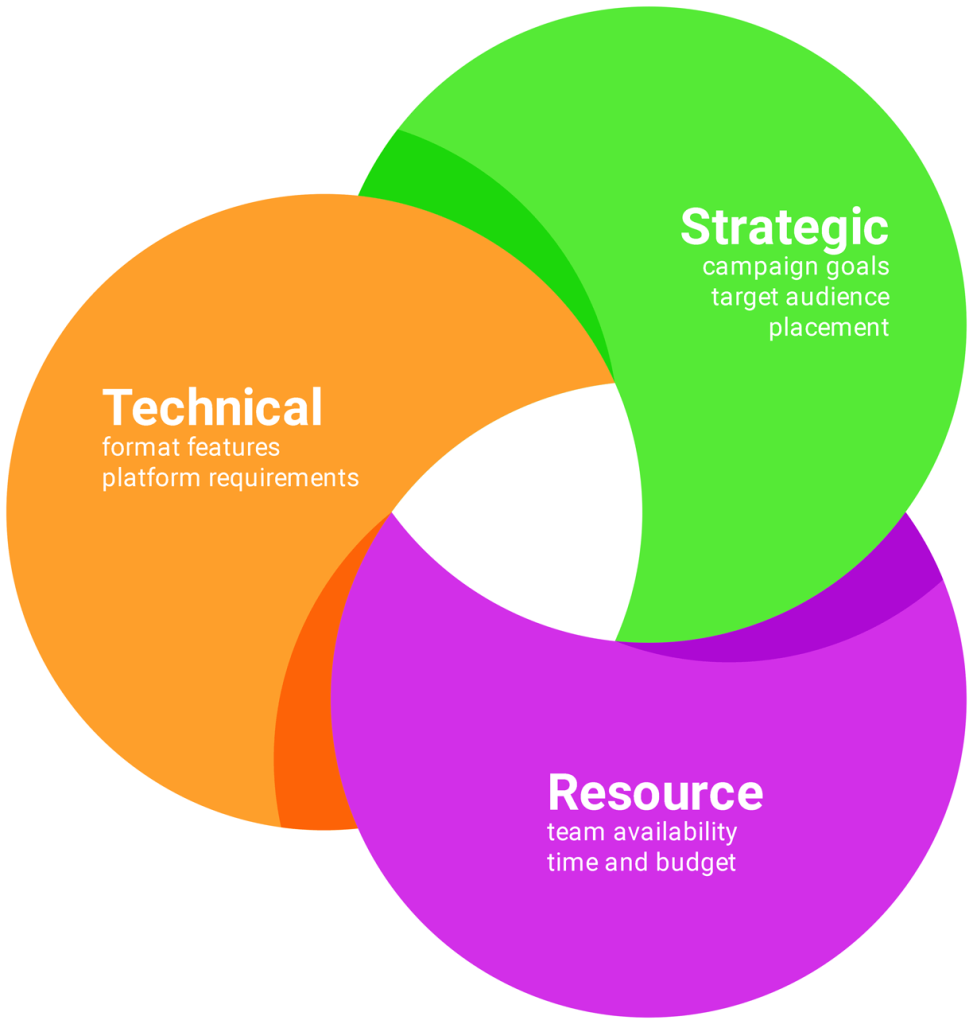
* Factors to consider when choosing a format
Campaign goals. Whether it's to increase brand awareness, drive website traffic, or conversions, the file format should align with the objective. For example, a format that allows for animation or video might capture more attention but could be excessive for a simple ad with a fixed offer. Understanding the objective allows you to choose a banner ad type and format that not only works technically but also enhances the communication.
Target audience. User behavior varies across segments. Some audiences engage actively with banners, while others tend to ignore dynamic content. If your audience primarily uses mobile devices, loading speed will be a critical factor. If you're targeting the B2B segment, clarity and quick delivery of the message will be more important. The format should be tailored to how your specific audience consumes content.
Placement environment. Where exactly will the banner ad be placed — email, social media, mobile apps, websites, or programmatic? Each environment has its own limitations regarding file types, file size, upload method, and the user's willingness to wait for an ad to appear. This affects both the choice of format and the prioritization of other factors.
File size. This is one of the most important factors. It directly affects loading speed and, therefore, the likelihood that the user will see the ad at all. If the file is too large, it may not load in time before the user scrolls past. Additionally, the ad may be rejected by the advertising platform, as most of them set strict file size limits (for example, the maximum file size for image ads on Google Ads is 150 KB).
Image quality and transparency. This is a factor that affects visual perception. If it's important to convey details, maintain the clarity of fonts or backgrounds, the format should support proper resolution and transparency, without artifacts. The choice of format directly impacts the visual quality and overall impression of the banner ad.
Support for animation and interactivity. If your campaign objectives require dynamics, interactivity, or video, choose formats that allow for it. But keep in mind: the more elements your banner ad contains, the more complex it becomes, the larger the file size, and the longer the load time. If the platform or users don't support or see the animation, it's a waste of resources.
Browser and device compatibility. Not all formats are supported equally well. For instance, some mobile browsers may block video autoplay, and older versions of browsers may not fully support HTML5. Before launching a campaign, it's important to ensure that the chosen format works properly across major web browsers and popular devices (especially mobile).
Ad platform requirements. Each platform has its own set of supported file types, file size limits, animation length, ZIP file structure, and more. Ignoring these requirements may result in the ad being rejected or displayed incorrectly. Familiarizing yourself with the official specifications will help you avoid issues. Here are some of them:
Availability of a team or contractor. Not all formats are easy to create "manually". Animation, interactivity, or video requires specialists, developers, video editors, sometimes even additional testing. If internal resources are limited, you should realistically assess your capabilities before choosing a format.
Time. Campaigns are often launched under tight deadlines. The more complex the format, the more time it takes to create, review, and approve. A simple format doesn't mean worse results — sometimes a simple JPEG banner ad with a strong message can outperform a complex HTML5 ad that wasn't fully optimized in time.
Budget. The format you choose directly affects costs, from creation to placement. If the budget is limited, you should consider cost-efficiency: does the result justify the resources spent?
To reduce the workload on the team and optimize time and budget, it's worth considering specialized online platforms for creating ads (such as BannerBoo). These offer user-friendly visual editors, ready-made templates, support for various formats, and simple export tools — allowing you to produce creatives faster and without involving designers or programmers.
Now that we've covered the characteristics of each format and the key factors to consider when choosing one, let's move on to a comparison.
The table below compares the formats across a number of important parameters. We've also included "Ad type" as a separate parameter. This is based on the technical capabilities of each format and reflects possible implementation options: static banner ad, animated banner ad, video banner ad, or rich media ad.
| Format | Ad type | File extension | Compression | Color depth | Animation support | Transparency support | Interactivity support | Compatibility |
|---|---|---|---|---|---|---|---|---|
| JPEG | Static | .jpg / .jpeg | Lossy | Up to 24-bit | No | No | No | High |
| PNG | Static | .png | Lossless | Up to 32-bit 1 | No | Yes | No | High |
| GIF | Static, Animated | .gif | Lossless | Up to 8-bit | Yes | Partial 2 | No | High |
| HTML5 | Static, Animated, Rich media | .zip | Depends on assets | Depends on assets | Yes | Yes | Yes | High 5 |
| MP4 | Video banner | .mp4 | Lossy | Up to 24-bit 3 |
Yes (video) |
No | Limited 4 | High 6 |
|
||||||||
What is the best file format for banner ads?
Although HTML5 can be considered the "most versatile" in terms of functionality, in the practice of advertising campaigns it will never completely replace other formats. Each format remains relevant for its specific use cases, and only a combination of a deep understanding of the campaign goals and the technical characteristics of the formats allows you to choose a truly optimal option.
To better understand the practical differences between formats, let's look at a few examples.
Example #1 (Fashion template from BannerBoo)
| 320 x 250 px | Ad size | |
|---|---|---|
| JPEG | PNG | Format |
| 41.5 KB | 95.7 KB | File size |

|

|
|
In this example, we have a classic banner ad that contains a background image, logo, and text. The JPEG format handled the graphics well, providing acceptable quality for a web banner. PNG, on the other hand, preserves slightly better clarity for text and graphic details but has almost twice the file size. The visual difference between the two is barely noticeable without zooming in, but the extra kilobytes can impact the page's loading speed.
Example #2 (Retail template from BannerBoo)
| 320 x 250 px | Ad size | ||
|---|---|---|---|
| GIF | HTML5 | MP4 | Format |
| 89.6 KB | 155 KB | 151 KB | File size |

|
|||
This example illustrates the classic use of GIFs in digital advertising. A minimalist design, limited color palette, and lack of complex effects align well with the format's strengths. Thanks to its high compatibility and small file size, this banner ad is perfect for both emails and display networks.
Example #3 (Travel template from BannerBoo)
| 320 x 250 px | Ad size | ||
|---|---|---|---|
| GIF | HTML5 | MP4 | Format |
| 2 064 KB | 162 KB | 3 343 KB | File size |

|
|||
This example proves that in cases involving complex animated graphics, GIF is the least effective option. In contrast, MP4 and HTML5 provide noticeably better graphic quality and smoother animation.
The small file size of an HTML5 ad is due to the fact that it's based on text code rather than video or a sequence of static images. Additionally, ZIP compression further reduces the data size.
Example #4 (Black Friday template from BannerBoo)
| 320 x 250 px | Ad size | |
|---|---|---|
| HTML5 | MP4 | Format |
| 4 708 KB | 4 673 KB | File size |
The banner ad in this example contains a dynamic video background, over which other elements appear (logo, CTA button, text blocks).
The MP4 format provides good video quality and smooth animation, but all elements are part of the video itself. This is a good option for platforms that support autoplay without sound.
In contrast, an HTML5 ad with embedded video has almost the same file size, but offers significantly greater functionality. The call-to-action button, logo, and text blocks are not just overlaid on the video — they are separate elements, which provides full interactivity.
GIF, in this case, isn't even worth considering. The format is technically incapable of handling a task like this.
Banner ads are often uploaded to an advertising platform or a website as a ready-made file (direct upload). This is a simple and convenient method that provides high compatibility and full control within the advertising system. However, for complex or large-scale campaigns, this approach may not be sufficient.
In such cases, alternative solutions are used that reduce repetitive tasks, simplify the updating of creatives, and avoid re-uploading files — even when making minor changes to the campaign.
Embed code is one of the most flexible methods available. It's especially useful when creatives are placed directly on websites or outside of advertising platforms. Instead of uploading a ready-made file, the creative is added as a fragment of HTML code that dynamically pulls content from an external source. This gives advertisers full control over the creative (its appearance and content) even after the campaign has launched.
At the same time, this approach requires some technical knowledge. Additionally, not all platforms support third-party code embedding, and some may render it incorrectly, so it's important to check compatibility with the specific system before using this method.
Depending on the technical implementation, embedding can be done in different ways. The two most common options are: via <iframe> or via <script>.
Option via <script>
This option is currently considered the most convenient and professional. Typically, the script is automatically generated by the ad platform or an online ad creation tool, and then embedded into a web page or advertising system. Here is a typical example:
<script src="//embed.bannerboo.com/b298946e7b1a2" async></script> Once this code is embedded, the banner ad automatically loads and displays on the web page. Importantly, the ad itself is not stored on the advertising platform but on an external server, so its content can be updated without the need for re-publishing or moderation in the system.
Option via <iframe>
Embedding via <iframe> is a more basic method that also allows loading of creatives from an external source, but it works in a more isolated manner. For example:
<iframe src="https://mysite.com/storage/banners/a01/index.html"
        width="300"
        height="250"
        frameborder="0"
        scrolling="no">
</iframe>
This option gives more control over the appearance of the ad, but it doesn't always provide the same level of flexibility or integration with analytics systems that is possible with <script>. It's typically used for banner ads created manually or built using HTML5 banner editors.
Overall, if the campaign requires frequent updates, analytics integration, or dynamic content, embedding via <script> is the best solution. However, for simple HTML5 banner ads, or when stability and compatibility are the priority, the <iframe> option can be a solid alternative.
The ad tag is primarily used in professional advertising environments — especially in programmatic advertising or when working through DSPs (Demand-Side Platforms) and ad servers. Essentially, it's a piece of HTML or JavaScript code inserted into the source code of a web page that initiates a request to the ad server (specified in the tag), where the appropriate creative is selected. The ad server then passes it back to the user's browser through the publisher's server, and the creative is displayed in a designated ad unit on the web page. Unlike embed code, which is typically created manually or by an ad builder, the ad tag is generated automatically by the ad server (e.g., Campaign Manager 360, Display & Video 360, or Adform).
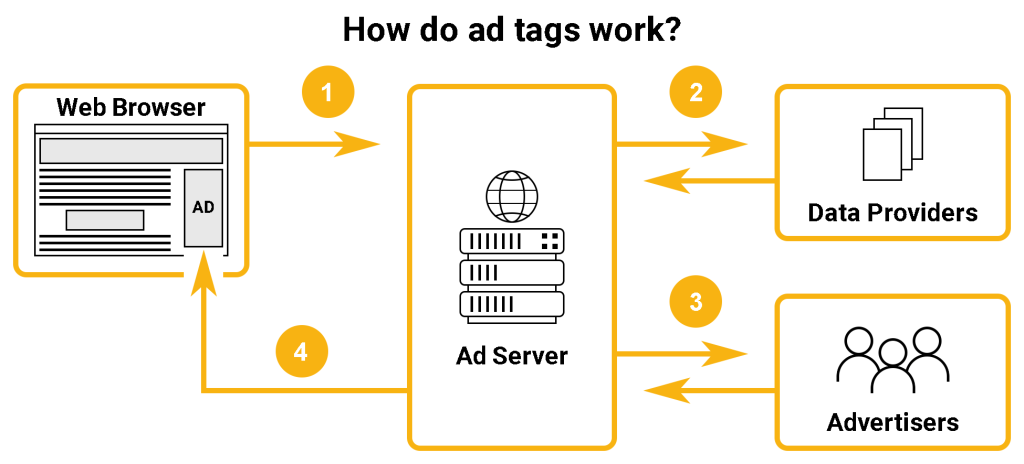
The advantage of this approach is that the advertiser retains full control over the display of creatives. Through the ad server you can update creatives in real time, adjust rotation or frequency capping, change targeting parameters, and run A/B testing — all without modifying the code on the side of each individual platform where the ads are running. In addition, this method provides access to more in-depth analytics and enables integration with third-party services for ad tracking.
This solution is especially relevant for large-scale campaigns where consistency and centralized management across dozens or hundreds of websites are important. However, it's worth noting that not all platforms support this method (for example, it is not available within the Meta). Moreover, using the ad tag requires technical knowledge and an understanding of how the ad stack works. That's why the ad tag is best suited for cases where the focus is not only on the creative itself, but also on flexible, strategic control of the campaign as a whole.
Theory provides us a foundation, but practice will show how things work in real life. Let's go over a few typical cases to better understand which format is most suitable under different conditions.
Quick launch of a campaign with a minimal budget
Not every campaign has a large budget or enough time to produce creatives. Quite often, ads need to go live immediately (for example, for a sale, a limited-time offer, or to quickly test a hypothesis).
In such cases, speed, ease of creation, and compatibility across most platforms are crucial. The optimal solution is a high-quality static banner ad in JPEG or PNG format that clearly conveys the key message.
At the very least, it serves as an entry point into the campaign, allowing you to get started quickly. Based on the results, the campaign can later be scaled or enhanced by introducing more complex solutions.
Simple animated ad to attract attention
When static banner ads are no longer getting the job done, a simple animated ad can be an effective next step. The goal of this approach is to make the banner ad more eye-catching while maintaining simplicity and versatility. Even basic animation can significantly improve CTR compared to a static ad.
In such cases, it is advisable to use GIF or HTML5. GIF is the simplest option, supported by almost all platforms and requiring no code, although it has limitations in image quality and animation smoothness. If you need higher quality and smoother animation, HTML5 is the better choice.
Advertising campaign with personalized content
Personalization is becoming increasingly important in modern digital advertising. In campaigns where a single banner ad may have dozens or even hundreds of variations depending on the audience, traditional approaches lose their effectiveness.
The best solution is HTML5 banner ads, which can interact with data feeds, pass or receive parameters, and dynamically update their appearance in real time. To enable this level of flexibility, it's best to serve ads not as uploaded files but by using an ad tag or embed code.
This approach is more complex to implement and requires careful planning, but it significantly increases the relevance of the ad and, therefore, the effectiveness of the campaign.
Retargeting campaign using data feeds
Retargeting without dynamic content is a missed opportunity. While it can work with simple banners, using data feeds and dynamic formats is what really allows you to achieve maximum relevance and return on investment.
For these cases, HTML5 banner ads combined with an ad tag or embed code are best suited. This combination makes it possible to create dynamic ads that automatically adjust content based on user data.
This solution is ideal for e-commerce, travel campaigns, marketplaces, and other industries where users leave digital "footprints" indicating their interests. In these cases, technical compatibility with a DSP or advertising platform that supports feed-based campaigns is critical, as well as compliance with feed formatting standards (for example, Google Merchant Center or Facebook Product Catalog).
Premium display campaign with interactive scenarios
Premium campaigns are usually part of a broader brand strategy, where not only visual impact but also user engagement, innovation, and creative execution play a key role. It's not just about a banner, but about a full-fledged interactive experience that should impress and be remembered.
HTML5 is the best solution in such cases, as it opens up maximum possibilities and allows you to implement ideas that go far beyond traditional banner advertising.
Ready-to-upload files are rarely used here. Instead, an ad tag or embed code is almost always used, providing not only flexibility but also the ability to collect interaction data, manage display logic, and run complex mechanics that can't be implemented within a standard file format.
Global campaign
Global campaigns typically span a wide range of platforms, languages, and ad sizes, complicating content management. In such cases, it's especially important to maintain centralized control over creatives, ensure consistency of messaging, and enable quick updates without having to re-upload files to dozens of platforms.
An ad tag or embed code works best here. This allows for centralized updates of ads, tailoring them to regional requirements and ensuring brand consistency on a global level. As for the format, HTML5 is typically used, as it's the most flexible and technically versatile option, compatible with most major advertising platforms and systems.
A campaign focused on storytelling
Campaigns that focus on a story rather than a single message require a format that allows for the gradual revealing of the plot, holds the audience's attention, and engages them emotionally.
Video formats, especially MP4, are commonly used in such cases. They allow the creation of a coherent narrative with sound, rhythmic transitions, and visual accents. Such videos can be either part of video inventory or embedded within a banner ad.
For more complex solutions, HTML5 is used, which allows for combining video, animation, visual effects, interactive elements, and at the same time make the content personalized. This opens up the possibility of non-linear plot development, when the user himself chooses the direction of interaction.
Mobile advertising
Mobile-focused campaigns have their own specificities that directly influence the choice of format. In this case, fast loading, small file sizes, and adaptability to different screen sizes are absolutely critical. That's why HTML5 is most often used.
For simpler scenarios, such as within mobile apps or the Google Display Network (GDN), static JPEG or PNG formats can also be used, with maximum file size optimization. Animated GIFs are also used, but with caution, as they can affect performance and delay loading.
Video formats are mostly used in video inventory or interstitial ads, where it is important to quickly convey a message without requiring a click (only through viewing).
Email campaign
Placing banner ads in emails has its own technical limitations, which significantly affect the choice of file format. Since most email clients do not support complex animations, interactivity, or video, email campaigns typically rely on simple formats that display correctly and provide a stable, predictable user experience.
In most cases, JPEG or PNG is more than sufficient. These formats provide high compatibility and fast loading. If you want to add a touch of movement, a lightweight, well-optimized GIF may be appropriate. Just keep in mind that not all email clients fully support animation, so the first frame will be decisive for user perception.
Learn more about using GIFs in email marketing in our article "How to create GIFs for email".
Hypothesis testing (A/B testing)
In general, the choice of format for A/B testing depends on the goals of the experiment and the available resources. The main objective is to enable the prompt creation of alternative versions of the ad without losing quality or violating technical requirements.
For basic tests (such as changing colors, text, or images), JPEG or PNG is usually sufficient. To test the impact of animation on user engagement, GIF is often chosen.
In turn, HTML5 provides the greatest flexibility and scalability. It allows not only changes to graphics or copy, but also experiments with animation, element behavior, interactive scenarios, and even personalization. When combined with an ad tag or dynamic data feed, the format becomes especially effective for real-time testing.
Optimization is not just a formality but a necessary condition for an effective campaign. It's not about sacrificing quality for speed, but about finding the right balance between visual quality, file size, and technical compliance.
In this section, we've compiled practical tips and tools that will help you avoid common mistakes and make your creatives not only visually compelling but also technically flawless.
Image quality
File size optimization
Animation
Optimization of HTML5 banner ads
Tools
Remember: there's no one-size-fits-all file format for banner ads. There is a file format that best suits the specific conditions and goals of your particular campaign. We hope this article has helped you better understand the possibilities of formats and make an informed, practical choice.