If there is anything constant in this world, it is the effectiveness of banner advertising! This format has long remained one of the key tools for online promotion, but its performance directly depends on choosing the correct banner size. To ensure ads don't get lost among the content and truly work for the brand and sales, it is important to understand which banner sizes attract users' attention best.
The effectiveness of banner advertising largely depends on the ad format. Knowing the standard banner sizes in 2026 is critically important for any marketer, designer, or business owner. Generally, it is vital for everyone involved in planning advertising campaigns. Using the correct standard sizes ensures that the banner displays correctly across all platforms, meets the requirements of advertising networks, and maximizes user attention.
Web banners are placed in various zones of a website: at the top of the page (leaderboard), in sidebars (skyscraper), within the content (rectangle), or on mobile screens. Each format has its own visibility and audience interaction characteristics. Knowing the specifics of each size helps avoid problems with incorrect cropping, scaling, or layout distortion, which directly impacts CTR and the effectiveness of the advertising campaign.
Equally important is knowing print advertising formats, especially when marketing materials are printed for events, exhibitions, or outdoor advertising. Correct sizes, high resolution (DPI), and consideration of technical specifications make the final product sharp, professional, and consistent with the design concept. Adhering to printing standards reduces the risk of detail loss, image distortion, and ensures a high-quality result on any material: from paper to vinyl structures.
Furthermore, this simplifies the process of adapting one design to several formats. Skillful scaling of elements, respecting the safe area, and proportional typography allow a single layout to be transformed into banners for the web, mobile devices, and printed materials without losing quality or readability.
By using this knowledge, you can plan advertising campaigns more effectively, ensuring maximum audience reach and increased brand awareness.
To ensure your advertising is effective, choose banner formats that are most compatible with advertising networks and web platforms. Each size has its own characteristics and optimal placement zones on a website. Understanding these and adapting them to business needs increases ad visibility, click-through rate (CTR), and ensures correct display on various devices.
Which web banner sizes are the most popular in 2026?
*example of the template on BannerBoo Leaderboard
Size: 728 × 90 px
Features: Located at the top of the page, highly visible on desktop, suitable for branding and promotional campaigns.
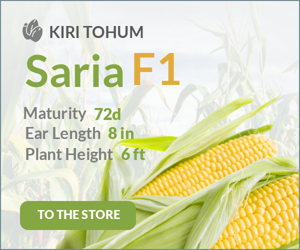
*example of the template on BannerBoo Medium Rectangle
Size: 300 × 250 px
Features: Used within content or in sidebars, has a high CTR, suitable for text-and-graphic advertising.
*example of the template on BannerBoo Large Rectangle
Size: 336 × 280 px
Features: Slightly larger than the medium rectangle, stands out among content, perfect for emphasizing a product or offer.
*example of the template on BannerBoo Wide Skyscraper
Size: 160 × 600 px
Features: A vertical format for sidebars, clearly visible while scrolling, suitable for branded messages.
*example of the template on BannerBoo Half Page
Size: 300 × 600 px
Features: A large format that occupies a significant part of the page, ensures high visibility, ideal for complex campaigns and promotions.
*example of the template on BannerBoo Mobile Leaderboard
Size: 320 × 50 px
Features: Optimized for mobile screens, located at the top or bottom of the page, well-suited for mobile advertising.
*example of the template on BannerBoo Square T
Size: 250 × 250 px
Features: A compact square banner, flexible in placement, suitable for responsive blocks and network advertising.
*example of the template on BannerBooSmall Square
Size: 200 × 200 px
Features: A small square format for sidebars and additional ad units, works well in network campaigns with a large number of banners.
In print advertising, it is equally important to adhere to standard formats. Correct sizes determine how professional and sharp the banner will look after printing and ensure compatibility with post-printing equipment. Adhering to the right dimensions, resolution (DPI), and bleeds avoids layout distortion, loss of detail, or "cut off" elements at the edges.
Most popular print formats:
Size:
Features: Standard format for hand-outs and mailings, suitable for promotional materials and offers.
Size: 420 × 594 mm (A2)
Features: Suitable for interior placement, exhibitions, or promotional zones; easily readable from a close distance.
Size: 594 × 841 mm (A1)
Features: Visible from a greater distance, ideal for promotional events or indoor spaces.
Size: 841 × 1189 mm (A0)
Features: Used for outdoor advertising, stands, and brand walls; large area for visual elements.
Size: 600 × 1600 – 800 × 1800 mm
Features: Mobile structures for events, exhibitions, and presentations; easy to transport and quick to assemble.
Creating a banner or advertising layout often begins with one primary design. To use it effectively for various formats, both web and print, it is important to follow certain adaptation principles. This helps maintain brand integrity, ensure visibility of key elements, and avoid issues with cropping or scaling.
To ensure web and print banners are as effective as possible and don't cause issues at the printer or in ad networks, check the following points before handing the layout to a designer:
Considering these points ensures that layouts will be ready for online publication or printing, will meet standards, and will preserve the effectiveness of the advertising message.
Banner sizes are not a technical trifle but a strategic tool for effective advertising. Knowing current formats allows you not only to avoid errors during placement but also directly impacts ad visibility, CTR, and the speed of launching advertising campaigns across all platforms.
In print advertising, the role of standards is even more critical. Properly selected banner sizes, optimal resolution (DPI), correct bleeds, and appropriate materials determine whether a banner will look professional or lose clarity and distort the design idea at the printing stage.
No less important is the design adaptation system. A clear structure, working with a grid, adhering to the safe area, and typographic hierarchy allow for layout scaling without loss of quality, readability, or brand recognition. This reduces production time, optimizes the budget, and ensures a unified visual style across all communication channels.
In summary, competent work with banner formats transforms a design from a simple image into a powerful marketing tool. Adherence to standards and technical principles is the foundation for stable impressions, high efficiency, and a competitive advantage in any advertising campaign.
The most popular formats are:
The most commonly used are:
The safe area is the inner zone of a banner where the main elements (logo, CTA, key text) are placed. Respecting this zone ensures that important information won't be cut off during scaling or printing and remains visible on all devices and formats.
For interior banners and posters, 300 dpi is recommended; for large outdoor banners, 75–150 dpi is sufficient (due to viewing from a long distance). The correct resolution ensures a sharp and professional image without pixelation.
Start with the smallest format, use a grid for proportional scaling of blocks, and respect the safe area and the priority of key elements (logo, CTA). Scalable headlines and minimal text will help maintain readability across all formats, both for web and print.