
The format of stories (stories), full-screen videos shared by users of the Instagram network, does not require a separate introduction. It is difficult to find a person who has not interacted with such content at least once in their life. As soon as stories appeared, they immediately became popular, and this is not surprising: the light and interesting format, the quick "disappearance" from the feed in 24 hours, the interactivity of elements and stickers have long won the hearts of users.
Do you need to use stories in your marketing strategy for business development in social networks? 100% yes. In addition to the fact that such short videos are characterized by high interaction rates (which are key metrics for a business profile), they can also be effectively used in advertising campaigns to increase reach and familiarize an even larger audience with a product or service.
This is a full-fledged advertisement on Instagram. Stories give viewers a sense of complete immersion in the company, process, or product. A vertical photo or video fills the smartphone screen and is almost indistinguishable from a regular post (with a "Sponsored" tag, but it is not very noticeable).
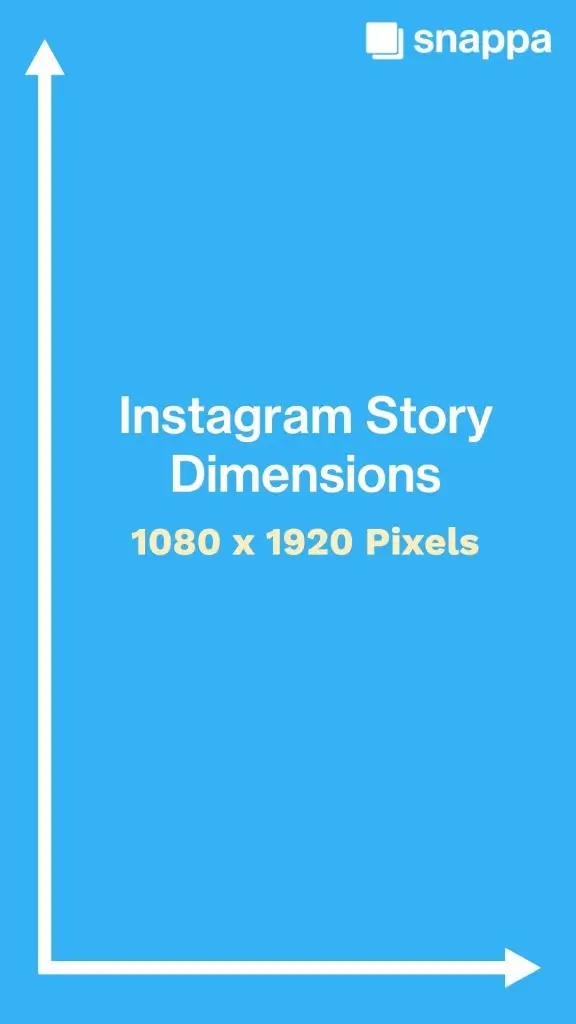
* photo taken from snappa.com
Story ads are available to brands or companies with any number of followers. Even more – this tool will help reach additional potential followers, engage them to view the publication, and then – visit the website or make a purchase.
In fact, 400 million people use Instagram Stories every day, and one third of the most viewed stories belong to business profiles of brands and companies. This is a continuous process: one story ends, another automatically starts, which means you will have additional contact opportunities among the stories of friends, family, and other favorite accounts of potential customers. In addition, advertisers can encourage potential customers to dialogue using variable calls to action (CTA).
If you are worried that 24 hours for a story to exist is too little, Instagram has solved this issue as well. Instagram Stories Highlights is a feature that allows you to save videos and photos under your profile bio for any length of time.
To highlight individual Stories, tap the circle labeled "New" (it's always the leftmost). Then you'll go to the archive, where you can choose any story created and published in the last two years to save. After you're done selecting, highlights will appear in your profile as a circle that plays like a separate story when someone taps it. The material is saved forever until you delete it yourself.
Advertisers who want to reach as many potential customers as possible need to be where their target audience spends time. That's why Instagram Story ads are a great solution.
First, it is the most popular content format that corresponds to the concept of brand nativeness. Stories have always gone beyond the rules and displayed images or videos in a user-friendly format.
According to https://business.instagram.com, 47% of users said that Instagram Stories help them be more interesting in communicating with friends and family. And for business, stories are an opportunity to show real and interactive content to gain audience engagement.
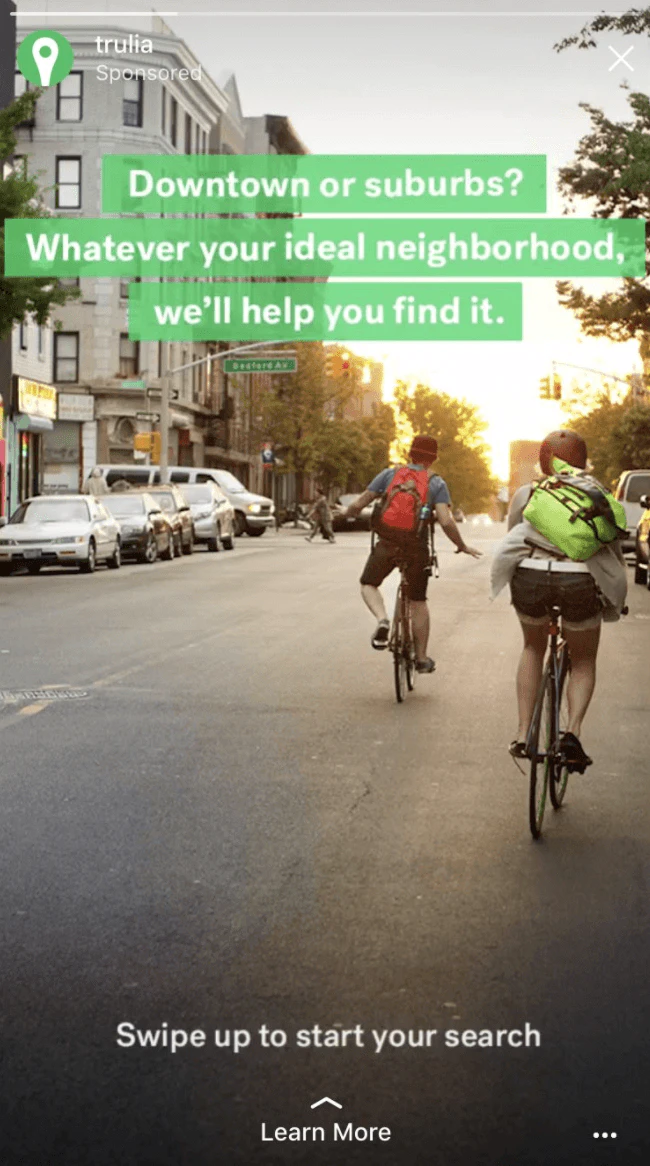
* photo taken from www.oberlo.com
Business profiles find it easier to reach people with story content than with posts. If you post several stories in a row (or at different times throughout the day), you improve your Instagram reach. According to SocialInsiders research, posting up to five stories a day provides a retention rate of about 70%.
organize a poll (using the "Poll" sticker);
stimulate dialogues and ask direct questions (for example, using the "Questions" sticker);
ask for feedback on a new product or line of business;
show how to use your product or service.
For example, if you have an online store - leave a link directly to the product card so that the client can go and buy the necessary product. If you don't have a product, you can also draw attention to blog posts, contests, lead magnets, or anything else you'd like to show your social media followers.
If you are not yet using Stories in your marketing strategy, it's time to start immediately! The relevance indicators of your business account can be very low when there are no stories.
The full-screen vertical Stories format remains a key tool for quick communication with the audience. Unlike the feed, stories are consumed quickly, so it's important to create creatives specifically adapted for this format (and not just cropped banners).
Stories don't necessarily have to be created completely "from scratch" every time — today, templates, story series, and adaptation for different campaigns work effectively, but the design should always take vertical UX into account.
Technical specifications of Instagram Stories:
Very important:
Instagram Stories ads are displayed full-screen. You can choose the call to action yourself from the available list to engage customers in dialogue. In addition, ad creatives can contain interactive elements: video effects, face filters, or stickers to attract the audience's attention.
| Graphic ads | This is the simplest and most popular format: one full-screen image or photo combined with the necessary text |
Technical requirements:
Important: the 4:5 format remains the standard for the feed, but Meta actively pushes vertical (9:16) creatives through Advantage+ placements. |
| Video advertising | It has two formats: short stories (up to 15 seconds) and long videos (up to 90 seconds - Reels Ads). Ads can be placed on the platform among regular user stories, and also - in Instagram Video (at the beginning, in the middle, or after videos) |
Technical requirements:
Subtitles: not mandatory, but Meta recommends adding them. |
|
Carousel |
A special format, similar to an image gallery (up to 10 photos), each with its own unique URL. The only nuance is that you will only be able to place 2-3 full-format stories; if there are more images or videos, they will be optimized for placement. |
Technical requirements:
Carousels in Stories can now have up to 3 fullscreen cards. |
| Instagram Reels | A format quite similar to regular Instagram Stories, but with any duration (more than 15 seconds). Users can like, comment, save, and share content. That's why the format is simultaneously similar to both regular posts and Instagram stories. |
Technical requirements:
The algorithm prioritizes native content (UGC-style) The first 1–2 seconds are critical. TikTok-like behavior: likes, comments, sharing = key to scaling. |
It is worth remembering that any video file for advertising longer than 15 seconds will also be displayed as a carousel of stories – one after another. The same principle will work: Instagram will automatically display one, two, or three ad cards, then the "Continue watching" option will appear, which allows you to view the rest of the content.

* photo taken from www.oberlo.com
A year ago, only accounts with more than 10,000 followers could add links to stories. The feature was very important: users just had to swipe up to visit a website page or other resource.
Now this functionality is available to every Instagram user. To add a link, you need to click on the "Link" graphic element when creating a story, specify the URL, and choose a call to action (CTA).
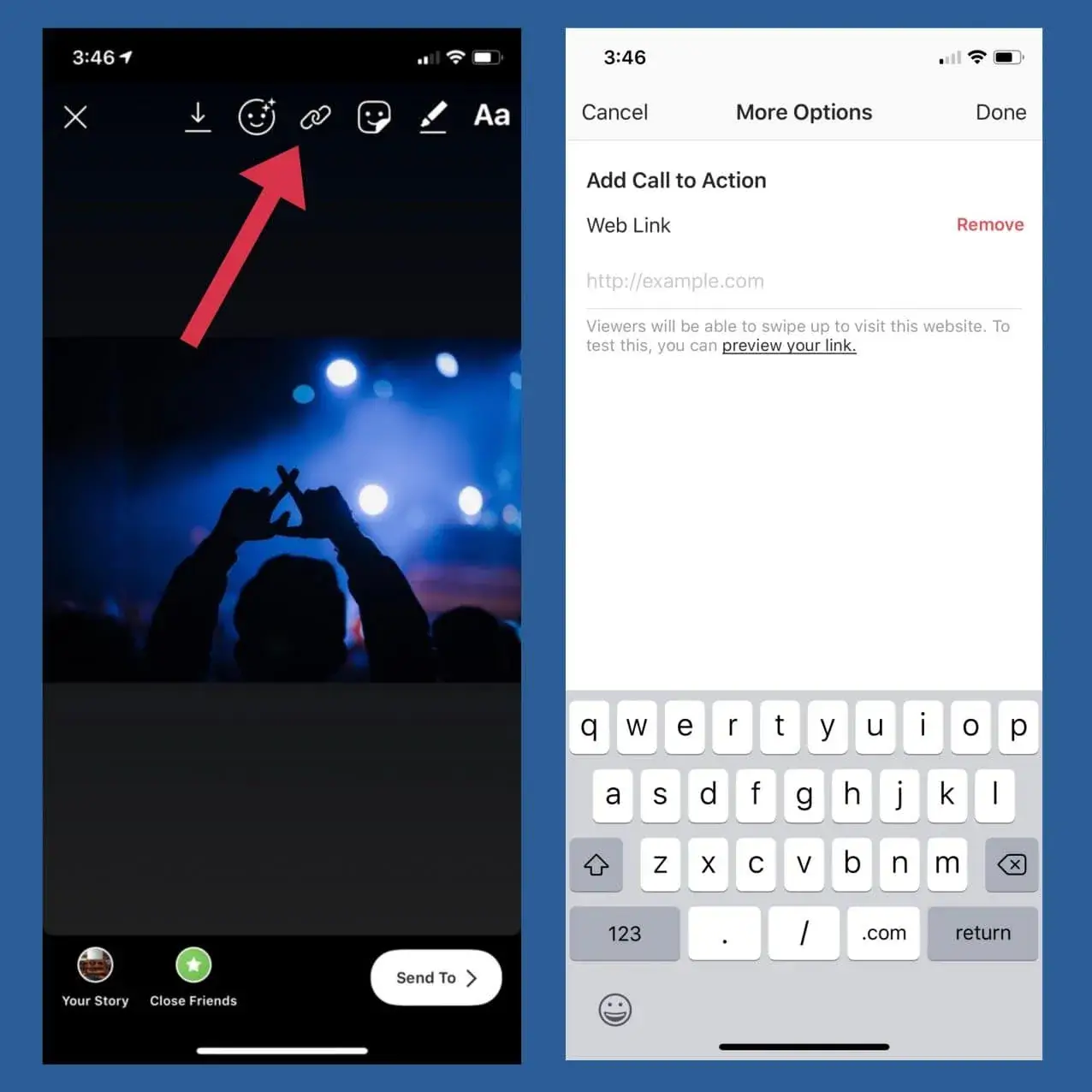
* photo taken from snappa.com
The most common calls to action (CTAs) include:
Book now;
Call now;
Contact us;
Donate;
Download;
Install now;
Learn more;
Listen now;
Order now;
Send message;
Shop now;
Sign up;
Subscribe;
If you have not chosen a CTA for your Instagram ad, the "Learn More" button will still appear in the ad. It will be highlighted in color (blue, black, gray, or as close as possible to your design – unfortunately, you cannot choose the color yourself) and will become active when viewing the ad.
Creating an ad story is more than just shooting a video with a front-facing camera. You need to think through the idea you want to convey to potential consumers, choose a visual style, and interactive elements.
You can use the BannerBoo service to create any creative stories for your personal blog or business profile. We have combined our clients' experience to create a huge database of templates (over 80 thousand) that can be used in your activities (including for advertising).
BannerBoo recommends using a personalized advertising strategy. Analyze your audience and highlight those business, product, or service accents that are important to them. The next step is to reflect this in layouts and videos. The online Instagram layout constructor will help you create a cool layout in just a few minutes.
How to create an ad for Instagram Story?
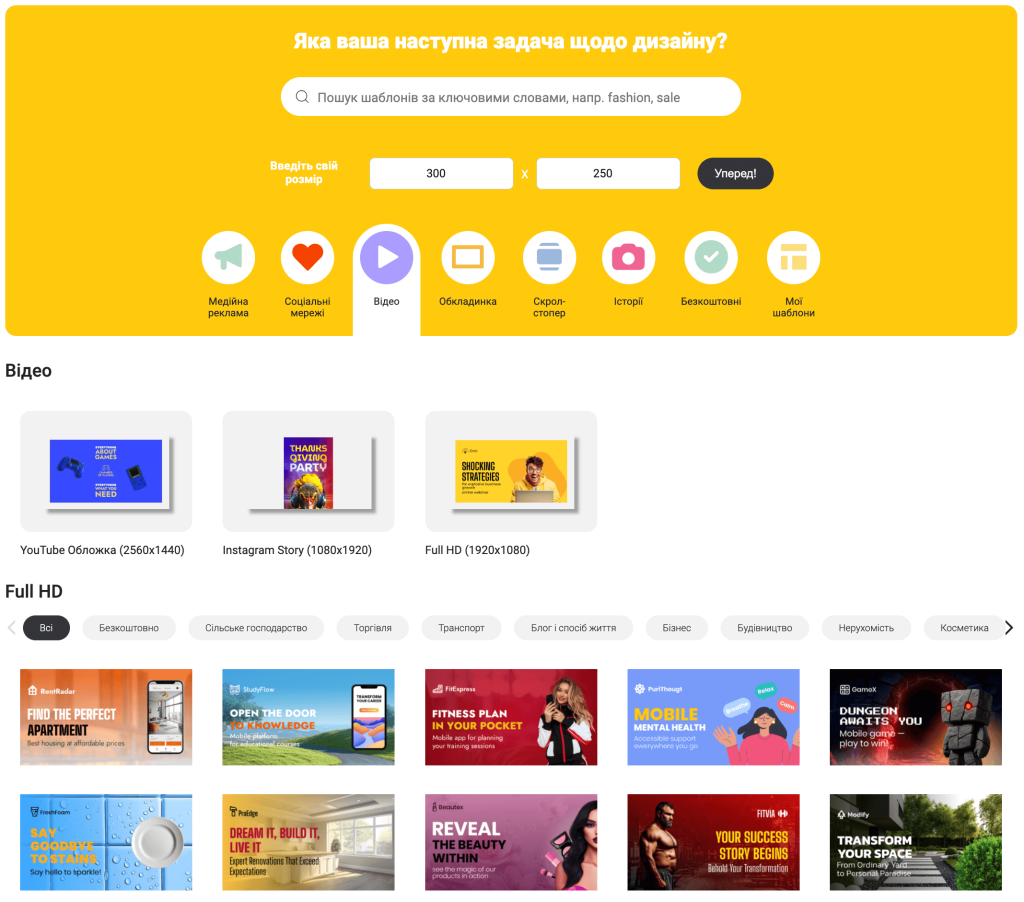
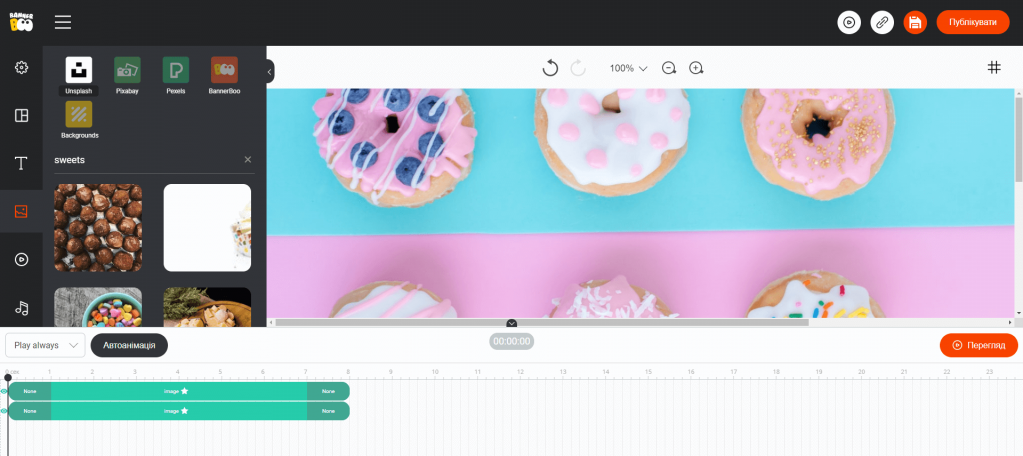
And that's it! The ad layout is ready to be uploaded to your profile or Instagram ad network.
Let's pause for a moment and remind you how to upload stories to Instagram:
tap the + icon in the Instagram app to get started;
choose a photo or video from your gallery that you want to post to your page;
add stickers, hashtags, and other interactive features to your Stories.
Promoting any uploaded story is easy and simple. More on that later.
Instagram is part of the large Meta corporation, so it does not have its own advertising algorithm. There are two ways to place ads on Instagram:
The easiest way to launch an ad is through Instagram's functionality.
* but moderation has become stricter (especially regarding health, finance, cosmetology, politics): from 10 min to 4 hours.
Important:
First of all, you need to set up a Meta business profile and link your Facebook and Instagram accounts. Then all functionality will become available.
Then everything is simple:
All further actions will be carried out through it, so log in to Facebook, go to Ads Manager, and click the "Create" button.
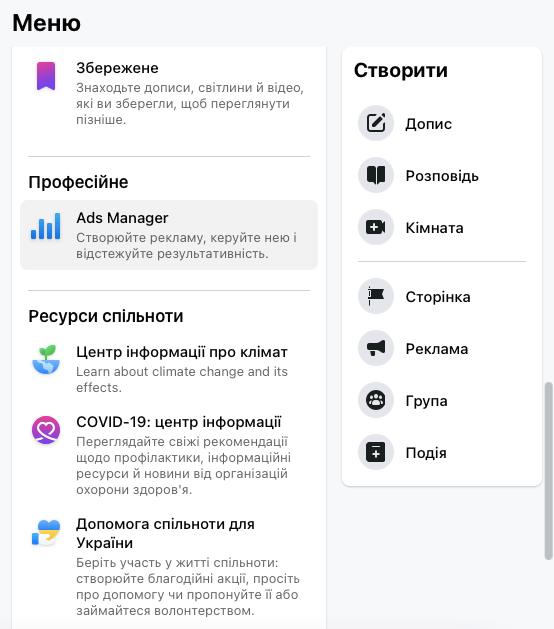
What is the goal of launching advertising? Sales, maximum audience reach, or increasing the number of subscribers? Each marketing goal corresponds to an advertising goal.
Current goal structure (ODAX, also used in 2026):
Stories are available for almost all goals, but:
We recommend naming it immediately so that you understand what this advertisement is about, what its goal is, and what audience it is targeted at.
By formula: name = goal + product + audience + geo
For example: Sales | Supplements | Women 25-45 | UA
You can create an audience based on demographic interests, choosing location, interests, age, gender, and other parameters that best describe the potential customer.
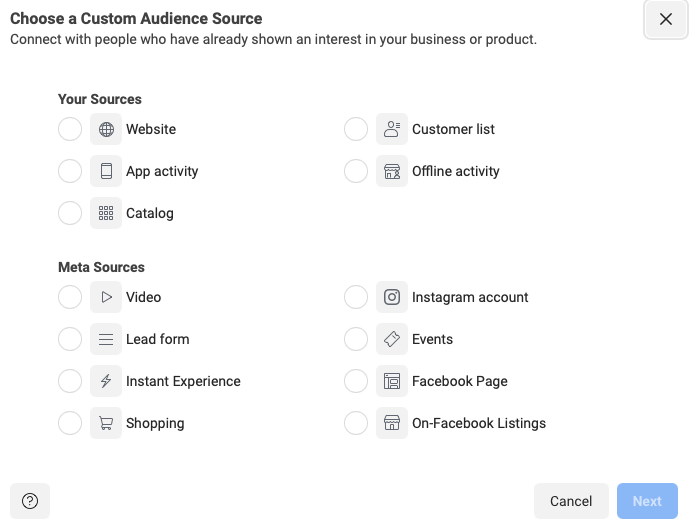
In addition, use Facebook's custom audiences to target Instagram users based on the following five segments:
existing customer contacts (email addresses, phone numbers, or any other information you collected during lead generation);
website traffic (targeting people who have visited specific website pages);
app activity (everyone who installed or interacted with the app);
offline activity: the number of people who interacted with your business directly in-store or by phone;
engagement: all people who interacted with your content on Facebook or Instagram.
Also available:
There are two ways:
Meta actively optimizes displays itself, so auto placements often yield better results.
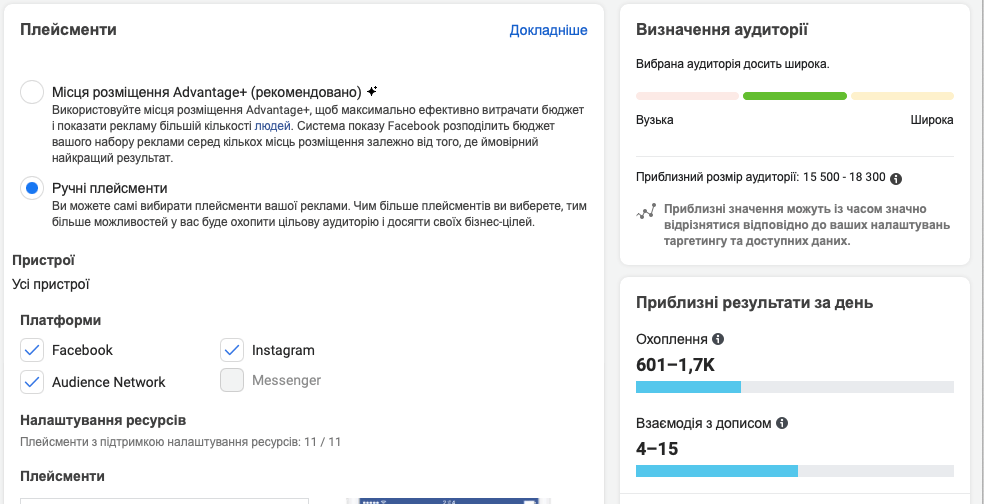
You can spend no less than:
At this stage, you need to decide how much you are willing to spend on an Instagram advertising campaign. You can set daily expenses or a budget for the entire duration of the ad. Then determine how long the advertising campaign will last: schedule start and end dates, if necessary. You can also show ads continuously.
The next step is to create the ad itself. To do this, select the format (image, video, carousel) and upload all the necessary graphic materials. After adding images or videos, write the headline and ad text, and finally add the URL and choose a call to action (CTA).
Meta allows simultaneous uploading of vertical and square layouts, and the algorithm itself selects the best one.
You can also make edits in Advantage+ Creative:
Enable the Facebook pixel to track ad effectiveness.
All that remains is to click the "Confirm" button to publish the created ad in Instagram stories. Usually, moderation takes from 1 to 24 hours. The more ads you launch, the less time is needed for their moderation.
Stories are easy to create to ask relevant questions to your target audience. You can ask questions, or conversely – give them the opportunity to write something about your business or industry. This is a great way to understand what information subscribers lack to optimize content and advertising strategy.
Open questions always arouse curiosity. And they also give the feeling that the business cares about informative content and respects the opinion of its audience.
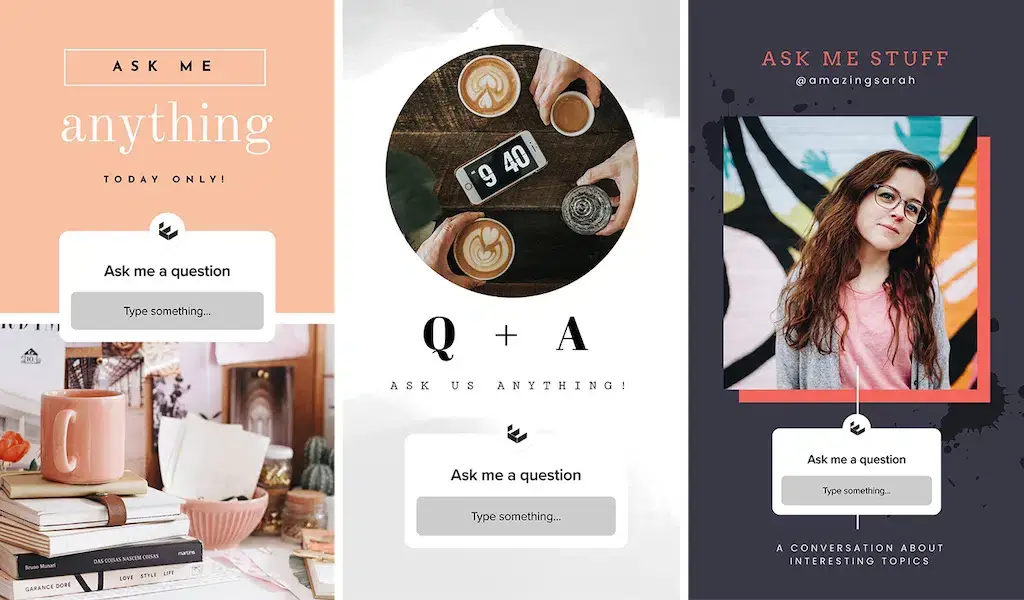
* photo from promo.com
The basis of the financial model in Instagram Story is an auction system, where advertisers are asked to define their budget before the campaign begins. It is also necessary to enter information about the maximum bid that a business can pay for a target action (conversion).
At the Instagram auction, it is decided which ads will be most useful to users based on:
the cost of the maximum bid;
conversion rates (based on already conducted advertising campaigns in your industry);
quality and relevance of the ad (how interesting it is to the audience).
These are the main factors. In addition, the industry, day of the week and season, average CPC, ad format, competition, ad duration, etc. also matter.
It is almost impossible to calculate the cost of an Instagram Story advertising campaign in advance; all data will show the average cost, which does not take into account the specifics of the industry, audience, and campaign.
Studies show that Instagram Story ads are more cost-effective than Facebook ads.
Important: these are guidelines, not guarantees
Trends 2026:
You should stick to these tips:
Instagram Stories are indeed a very important part of any business's marketing strategy. Make them as effective and useful as possible for your audience.
How to do it? Here are some tips:
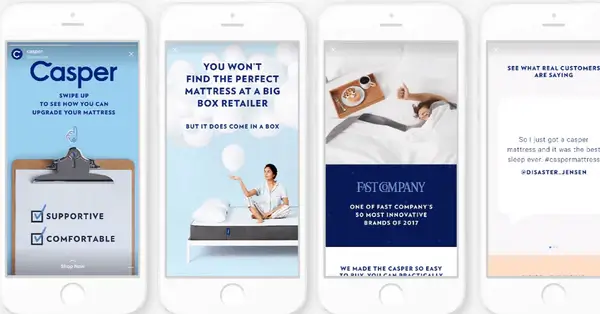
* photo from analisa.io
Always be visible:
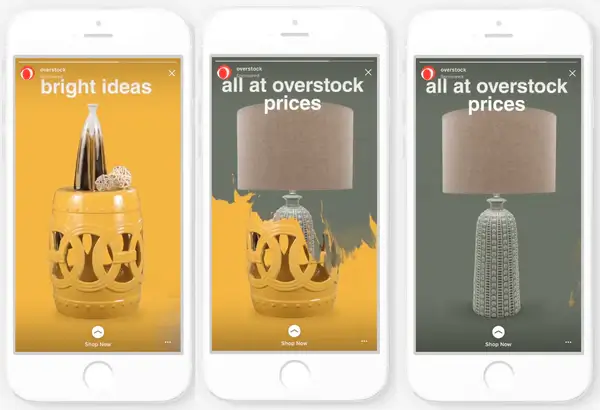
* photo from https://cdn.shopify.com
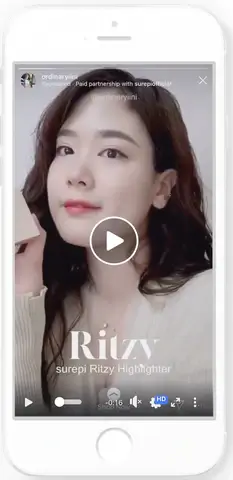
* photo from https://cdn.shopify.com
Stories Trends 2026:
Instagram Stories ads will be most effective if you follow the tips above.
Stories are a full-fledged sales tool. But for advertising to work, it's important to build creatives correctly.
Instagram advertising is a great creative opportunity to share information about your company, products, or services.
Make your ads noticeable and bright with BannerBoo. In just a few minutes, create visual elements and layouts of the correct size, taking into account campaign goals, templates, and the necessary structure. Then launch ads to reach even more members of your target audience.
And most importantly – measure the effectiveness of any layout and story. Regardless of how well an advertising campaign is planned, test and evaluate ads to check what can be improved and save money. You may find that one ad generates five times more conversions than 10 others. Or that one specific ad placement leads to lower costs. This data should be taken into account.
Experiment with Instagram Story ads and get high performance indicators!
In 2026, Meta's algorithms value regularity and stability even more. Optimal frequency: 3–5 Stories daily or series of 3–7 stories in 1–2 approaches.
Important:
The algorithm takes into account the series completion rate, not just the fact of publication.
The most effective Story Ads are short vertical videos of 6–10 seconds, created in 9:16 format. They yield the lowest CPM and highest engagement.
Series of 2–3 Stories with a clear CTA and interactive elements also work well.
Yes. Stickers in Stories (Poll, Quiz, Questions, Emoji Slider, Add Yours) significantly increase engagement and improve the ranking of stories on Instagram. Poll, Quiz, Emoji Slider, Questions, Add Yours all work.
In 2026, interactive Stories were more likely to appear in the top view line and receive more repeat impressions from the audience.
Meta recommends using broad audiences and Advantage Detailed Targeting. This results in a lower cost per click and better scaling.
Precise targeting should only be used for remarketing and warm audiences. The AI algorithm finds buyers better than manual targeting.
Average cost indicators:
The price is influenced by the creative quality, seasonality, competition, and campaign optimization. Reels Ads are often cheaper, so brands use both formats in parallel.
The reasons could be:
In 2026, 3–7 days of optimization and 50+ events are needed for stable results.