What is the easiest way to grab the attention of a potential customer in a split second? That's right, show them a video! Thanks to motion, dynamics, and emotional impact, the video format can turn an ordinary banner into an engaging and memorable story. In-banner video advertising demonstrates how both large and small brands use this format to build an emotional connection with the viewer, increase brand awareness, and drive conversions. Let's look at how to properly use video in banners and make advertising truly effective!
In recent years, video advertising has become even more personalized, lightweight, and interactive. While brands previously mostly used short videos for YouTube or social media, today more and more companies are integrating video directly into HTML5 banners.
In-banner video ads allow you to combine the benefits of classic banner advertising with the dynamics of video, without forcing the user to navigate to another page or interrupt their content viewing. Thanks to the development of AI tools and modern HTML5 builders, creating such banners has become accessible even without design or video editing skills.
That is why in 2025–2026, in-banner videos remain one of the most effective formats for Display Advertising.
Imagine a banner that doesn't just show a logo, but literally comes to life – moving, speaking, telling a story, and evoking emotions. This is precisely what video advertising in banners is: a modern approach that combines the dynamism of video with the effectiveness of traditional banner ad formats. Instead of a static image, the user sees a short video clip or GIF animation created using HTML5 or JavaScript. Such a banner can start playing a video immediately after the page loads, on mouse hover, or only after a click – it all depends on how the brand programmed this action.
What makes video banners so special? They don't just display an ad – they engage users into conversions and dialogue. Sound, motion, interactivity, call-to-action buttons, or even mini-quests create a sense of presence. The viewer doesn't just see the company or brand; they interact with it and become part of the marketing activities.
All these factors contribute to:
Often, video ads in banners achieve higher CTR and engagement rates than regular static images. Moreover, thanks to analytics, you can track user behavior and tailor targeting to the specific interests of people who spent the most time viewing the banner ad. Consequently, the performance of such remarketing campaigns will be very high!
Depending on how the brand wants to interact with the audience, three main formats are distinguished: Click to Play, Hover to Play, and Autoplay. Each has its own advantages and best-use cases. Let's look at them in more detail.
The most traditional format: it displays a static image until the user clicks on the banner, after which the video playback begins. Click to Play is most commonly used on social networks, where the user interaction rate with content is crucial.
This format is ideal for both the brand and the user:
This is a more dynamic format: the video begins playing when the user hovers the cursor over the banner and stops when the cursor leaves. This creates an effect of interactivity and "immersion" into the content. At the same time, the likelihood of accidental triggers is higher, especially when the user is actively browsing.
Key benefits of Hover to Play:
Autoplay launches the video automatically as soon as the user arrives on the website page or app. Most often, the audio track is muted initially so as not to annoy the user, and it can be turned on manually (via a dedicated control panel).
What are the main benefits of this format?
The choice of an in-banner video ad format depends on the campaign goals.
If the primary goal is to engage the user in interaction, Click to Play or Hover to Play is suitable. If you need to quickly reach a broad audience, Autoplay is the best solution.
Before moving on to examples, it's worth understanding how in-banner video ads differ from other popular video advertising formats. While they all use video content to attract audience attention, each format has distinct characteristics regarding placement, user interaction, and marketing goals.
Understanding these differences will help you choose the most effective solution for your specific advertising campaign.
In-Banner Video vs Pre-roll vs Outstream
| Format | In-Banner Video | Pre-roll | Outstream |
|---|---|---|---|
| Where is it displayed? | Inside a banner | Before a video | Inside content |
| Does it interrupt the user? | No | Yes | No |
| Autoplay | Yes | Yes | Yes |
| Option to skip | Usually no | Yes | Depends on the platform |
| Ad channel | Display Ads | YouTube Ads | YouTube Ads |
| Launch cost | Lower | Higher | Medium |
Each format has its own benefits and use cases. However, in-banner video ads uniquely combine high visibility with a comfortable user experience, as they do not interrupt content viewing but instead integrate seamlessly into the page's ad inventory. That is why this format is increasingly used in Google Display Network campaigns, programmatic advertising, remarketing, and eCommerce marketing, where it is essential to capture user attention without intrusive disruptions.
Banner video advertising serves as a bridge between static ads and full-scale video clips. It works exceptionally well with various audience segments, is lightweight and easy to understand, making it a powerful driver in marketing strategies.
If you are just planning to incorporate banner videos into your advertising campaign, it is worth thinking through key details in advance and understanding which methods work specifically in your industry. The best way to avoid mistakes is to analyze the proven experience of other brands!
Author: Ramjan
If you need to place a lot of text and think video advertising isn't suitable for it, take note of how this is handled in the example by Ramjan. Throughout the video, slides transition with different textual content, revealing more information to the potential audience. Notice how well the hierarchy is built: the urban background image perfectly conveys the theme's mood without distracting from the core message.
Author: BannerBoo
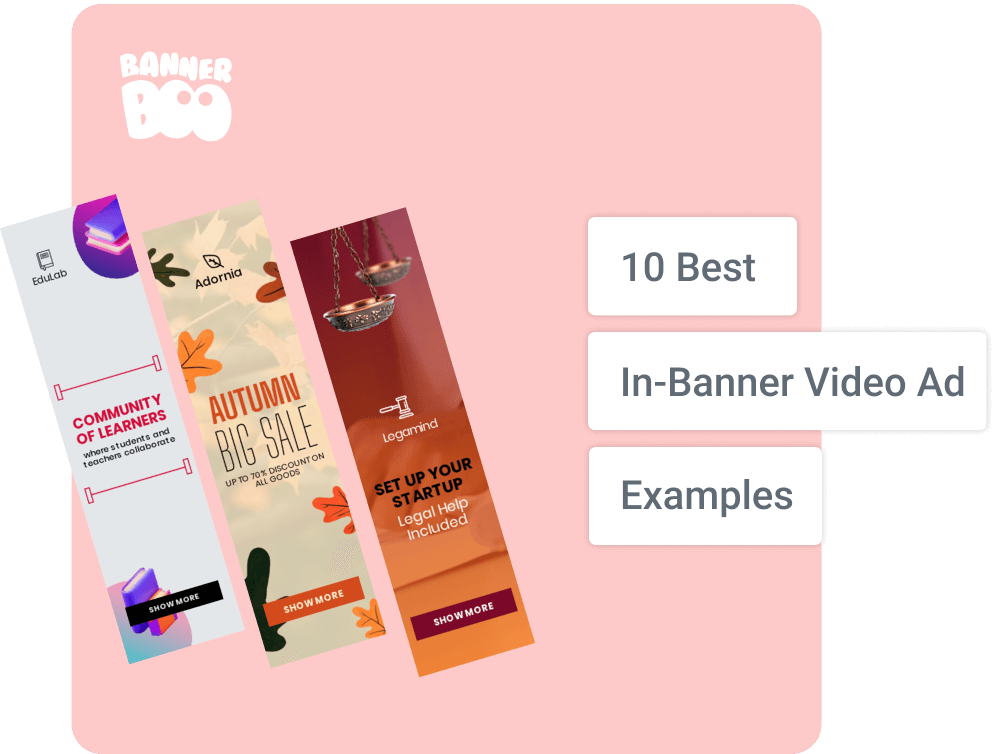
A wonderful video banner for the education sector: it highlights the benefits of an educational platform where learning is an interactive dialogue rather than a one-way process. The template features distinct accents on the key message, warm colors, and balanced typography. Hand-drawn graphic elements evoke positive, warm emotions.
Author: Ramjan
An event invitation can also be created in the In-Banner Video format, and this is a great choice because a dynamic visual sequence conveys emotions much better than a static image. The ad features a well-structured element hierarchy, stylish typography, and a restrained color palette built on contrast principles. The CTA is highlighted effectively, clearly indicating what action the company expects from the audience after watching the ad.
Author: BannerBoo
The core concept of this banner is to convey the confidence a client gains from partnering with a law firm. It communicates security, certainty, and a fast launch. The emphasis on the phrase "Legal Help Included" serves as the primary competitive advantage. The graphics are concise, featuring business-associated elements: documents and legal iconography. At the same time, the video looks modern, high-tech, and yet simple.
Author: Ramjan
When you need to invite people to a conference via video, you must emphasize expertise, openness to collaboration, and genuine value for potential partners and clients. This banner accomplishes that task brilliantly! It looks clean, tech-savvy, and professional, isn't overloaded with unnecessary elements, and includes a distinct CTA. Notice the thoughtful execution in every component: large headlines, speaker blocks, and an emphasized button. Everything in this banner is executed properly: without fluff, focusing on trust, professionalism, and real people.
Author: BannerBoo
Running a sale collection? Showcase it in a video banner! The main premise of this ad is a valuable offer, with the focus on the phrase "Make it your own" and the "50% OFF" discount. The colors are contrasting, and the style centers around the product and its versatility. In the fashion industry, it is particularly crucial to evoke a sense of ownership: not just displaying the item, but highlighting how it complements the owner's individuality.
Author: Bidyut Kumar
The objective of this banner is to demonstrate that travel is all about emotion, movement, and fulfilling dreams. The company doesn't just sell tours; it helps turn dreams of exploring new countries, adventures, and freedom into reality. The main focus of the ad is to spark a vivid sense of joy and anticipation of travel, awakening the viewer's desire to break out of routine and hit the road. A fun aesthetic and a soothing color scheme were chosen to achieve this.
Author: BannerBoo
A great sale ad concept that will make your brand stand out from market competitors. The bold discount numbers on the banner immediately grab attention! Meanwhile, the autumn color palette (orange, brown, yellow) sets the mood. Key benefits of the template include seasonal flavor, large typography, dynamic leaf animation, and high contrast between the warm background and white text.
Author: Francesco Zagami
This banner combines minimalist design with dynamic video content, creating an "editorial" style feel. A clean layout, elegant typography, and a visual carousel make the video ad appealing and contemporary, highlighting the uniqueness of the offer. Notice how harmonious the video looks thanks to the thoughtfully selected color palette.
Author: BannerBoo
A video banner template for the services sector. The core message of this video is to show that the company offers not just care, but compassionate support tailored to each client's individual needs. Visually, this is reinforced by calming colors, photography, smooth video pacing, and emotionally evocative illustrations. Such a banner inspires trust – the key factor in the care industry.
P.S. Photos featuring real people, smiles, and human touch often perform significantly better than abstract imagery.
In fact, the rules for video banners are not drastically different from the rules for creating any effective advertising.
Follow these guidelines to ensure:
Don't forget to test different banner variations to discover which ones drive higher CTR and engagement rates.
Modern platforms like BannerBoo help you produce in-banner videos without complex software or workflows, adapt them rapidly across various devices, and maintain top-notch content quality.
Creating a video banner takes just a few minutes and requires no programming knowledge.
Once you understand all the benefits of video advertising, you won't want to leave this format out of your media plans. And with BannerBoo templates, you won't spend excessive time designing In-Banner Video ads. Give it a try!
Modern AI tools allow you to automatically generate ad banners from a short text prompt. Instead of starting a design from scratch, simply describe the desired style, colors, product, and campaign goal.
Combining AI with pre-designed templates speeds up campaign launches and enables rapid generation of multiple creative variations for testing.
For video advertising to perform effectively, it is essential to consider not only its benefits but also potential drawbacks. Marketers and business owners need to strike the right balance between creativity and mobile optimization to make banners truly deliver results!
Enhanced user experience
Banner video ads integrate smoothly into the webpage and are perceived as part of the content rather than intrusive ads. Users can interact with them voluntarily, which is a definite plus!
Flexibility in contact duration
Banner video has no rigid length limits, allowing you to showcase short teasers or more comprehensive stories. You only need to adhere to technical file size restrictions, typically up to 500 MB (especially for mobile traffic).
Higher content engagement rates
Eye-catching and interactive videos stand out among static banners, encouraging users to engage with the campaign and improving call-to-action (CTA) performance.
High interactivity
Video banners easily accommodate custom features: buttons, interactive elements, quizzes, mini-games, and more, making the ad more captivating and fun for the audience.
Increased brand awareness
Motion, sound, and animation help users remember the brand and its message better, creating a stronger emotional bond with the audience.
Cross-device adaptability
Banner videos play seamlessly across desktops and mobile devices, ensuring effortless interaction on any screen size.
Analytics collection and optimization
Video banners make it easy to track user engagement time, views, and clicks, which aids in refining remarketing strategies to boost overall advertising ROI.
Prevalence of ad blockers
An increasing number of users employ ad-blocking software, which reduces impressions and clicks on banner video ads. It is crucial to produce relevant, engaging content that does not irritate the user and blends naturally with websites.
Slower page load times
Video in a banner adds extra data payload, which can slow down page loading. Because of this, users may leave the site before the content loads, increasing bounce rates. Focus on optimizing not only the banner itself, but the entire landing page!
Creative constraints
A banner has strict boundaries and limited canvas space, making it challenging to tell a complete story or convey complex messaging. Here, continuous practice and testing are key!
In summary, In-Banner Video is a powerful marketing tool, but it requires a strategic approach. Marketers and business owners must weigh the pros and cons to strike the right balance between creative visual impact, loading performance, and campaign efficacy.
Video banners continue to evolve rapidly. Modern advertising campaigns increasingly leverage artificial intelligence, personalization, and interactivity in place of static creatives.
Artificial intelligence enables the creation of dozens of banner variations in minutes. This drastically reduces creative production time and simplifies A/B testing.
Videos lasting between 6 and 15 seconds that loop seamlessly deliver the highest performance metrics.
More and more ad platforms allow dynamic adaptation of copy, CTA buttons, featured products, or even video scenes based on the viewer segment.
A single video banner can automatically adjust to fit dozens of ad placements and dimensions without needing individual manual layouts.
HTML5 has firmly established itself as the universal standard for modern banner ads thanks to full support across all browsers and mobile devices.
Modern in-banner video ads bring together the visual power of video and the versatility of banner advertising, helping brands win attention without disrupting the user experience. Thanks to HTML5, AI generation, and responsive design, building high-converting video banners has become significantly simpler and faster.
Whether you are running a campaign in the Google Display Network, programmatic platforms, or remarketing funnels, modern tools like BannerBoo empower you to build effective video banners in a matter of minutes.
It is also worth keeping certain technical nuances in mind: for instance, browser autoplay restrictions or heavy file weights can slightly slow down page loads, affecting a user's readiness to engage with your offer. Therefore, strive for the right balance between informative content and file weight, test different formats, experiment, and reap the full spectrum of benefits that high-performing advertising offers to any business!
And, of course, remember: the decision to implement banner video ads should be grounded in specific website objectives, content aesthetics, and the interaction habits of your target audience!
Video advertising in banners supports the same standard dimensions as traditional banner ads. The most common sizes include:
These sizes are compatible with most ad platforms. As a result, video banners can be effortlessly adapted across various websites, devices, and ad networks.
Three primary types are most widely used:
Yes, modern ad creation technologies adapt banners for mobile devices without compromising on quality or performance.
The key difference is that banner video ads are embedded directly within the webpage layout, do not interrupt the main video/editorial content, and remain an organic part of the website design.